Testpassport

 sales@testpassport.jp

下記はMicrosoft MS-302試験問題集は実際の試験問題のバージョンの一部です。 Microsoft 365 Certification MS-302問題集 は実際の試験問題バージョンには95問になります。すべての実際の試験問題は、勉強者が最初の試みで成功することを保証できます。MS-302問題集の実際の試験問題でMicrosoft試験に不合格になった場合、全額で支払い手数料の払い戻しを受けられます。実際の試験問題をトレーニングしたいでしょうか? では、トレーニングしましょう!

 MS-302フルバージョンを入手

問題#1

Note: This Question is part of a series of Questions that present the same scenario. Each Question in the series contains a uniQue solution that might meet the stated goals. Some Question sets
might have more than one correct solution, while others might not have a correct solution. After you answer a Question in this section, you will NOT be able to return to it. As a result,
these Questions will not appear in the review screen.
Your company has a Microsoft 365 subscription. The company has 1,000 users. You recently asked all the users to store content in Microsoft OneDrive for Business. You need to identify how many users are actively using OneDrive for Business.
Solution: From the Microsoft 365 admin center, you view the usage reports.
Does this meet the goal?

A. Yes
B. No

Explanation:
Use the OneDrive usage reports. You can use the OneDrive usage reports to gain a high-level view of the value you are getting from OneDrive in terms of the total number of files and storage used across all the OneDrive accounts in your organization. You can then drill down to understand the trends of active OneDrive accounts, how many files users have interacted with, and how much storage is used. These reports can also give you the details per OneDrive account. References: https://docs.microsoft.com/en-us/graph/api/resources/onedrive-usage-reports

問題#2

Note: This Question is part of a series of Questions that present the same scenario. Each Question in the series contains a uniQue solution that might meet the stated goals. Some Question sets might have more than one correct solution, while others might not have a correct solution.
After you answer a Question in this section, you will NOT be able to return to it. As a result, these
Questions will not appear in the review screen.
Your company has a Microsoft 365 subscription. The company has 1,000 users. You recently asked all the users to store content in Microsoft OneDrive for Business. You need to identify how many users are actively using OneDrive for Business.
Solution: From the OneDrive admin center, you view the Data Migration settings.
Does this meet the goal?

A. Yes
B. No

Explanation:
Use the OneDrive usage reports. References: https://docs.microsoft.com/en-us/graph/api/resources/onedrive-usage-reports

問題#3

You plan to deploy Microsoft SharePoint Online sites.
You need to recommend a solution that provides consistent global navigation across multiple site collections.
Which navigation approach should you include in the recommendation?

A. structural navigation
B. Quick Launch
C. managed navigation
D. hub sites

Explanation:
One common reQuest when working with SharePoint sites is having a consistent navigation across multiple site collections. If you are using a Publishing Portal site template, you can use the Managed Navigation for your Global Navigation (or top navigation).
References: https://eschrader.com/2017/05/24/sharepoint-online-global-navigation-across-site-collections/

問題#4

You are the global administrator of a Microsoft 365 subscription.
A user named User1 deleted a file 83 days ago from a site named Site1. Site1 is in a site collection named Marketing.
You need to recover the deleted file.
What should you do?

A. Use the Recycle Bin of Marketing
B. Create a Microsoft support ticket
C. Use the Recycle Bin of the root site collection
D. Use the Recycle Bin of Site1

Explanation:
When you delete an item from a SharePoint document library or list, it isn’t immediately removed from SharePoint. Deleted items go into the site recycle bin for a period of time. During that time, you can restore the items you deleted to their original location.
Restore items from the SharePoint 2016 or 2013 Recycle Bins
Click Recycle Bin in the Quick Launch bar on the left of the screen.
On the Recycle Bin page, click the box to the left of the items or files to select the ones you want to delete or restore.
Click Restore Selection to recover the selected files.
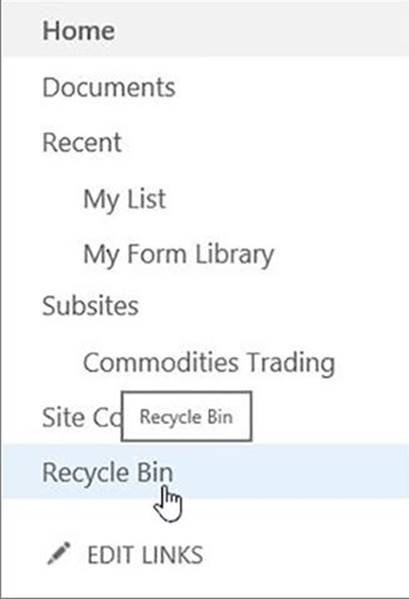


References: https://support.office.com/en-us/article/restore-items-in-the-recycle-bin-of-a-sharepoint-site­6df466b6-55f2-4898-8d6e-c0dff851a0be

問題#5

You have a Microsoft SharePoint Online site collection.
You create a term set group. You need to ensure that a user named User1 can create new term sets in the term set group.
The solution must use the principle of least privilege.
Which role should you assign to User1 to best achieve the goal? More than one answer choice may achieve the goal. Select the BEST answer.

A. Contributor
B. Editor
C. Group Manager
D. Term Store Administrator

Explanation:
A Contributor can create or change a term set.
References: https://docs.microsoft.com/en-us/sharepoint/assign-roles-and-permissions-to-manage-term-sets

試験コード: MS-302問題数量: 95 Q&As更新時間:  2019-03-16

  MS-302フルバージョンを入手