Testpassport

 sales@testpassport.jp

下記はMicrosoft AZ-103試験問題集は実際の試験問題のバージョンの一部です。 Microsoft Azure certification AZ-103問題集 は実際の試験問題バージョンには369問になります。すべての実際の試験問題は、勉強者が最初の試みで成功することを保証できます。AZ-103問題集の実際の試験問題でMicrosoft試験に不合格になった場合、全額で支払い手数料の払い戻しを受けられます。実際の試験問題をトレーニングしたいでしょうか? では、トレーニングしましょう!

 AZ-103フルバージョンを入手

問題#1

Case Study: 3

Contoso Case Study
Overview
Contoso, Ltd. is a consulting company that has a main office in Montreal and two branch offices in Seattle and New York.
The Montreal office has 2,000 employees. The Seattle office has 1,000 employees. The New York office has 200 employees.
All the resources used by Contoso are hosted on-premises.
Contoso creates a new Azure subscription. The Azure Active Directory (Azure AD) tenant uses a domain named contoso.onmicrosoft.com. The tenant uses the P1 pricing tier.

Existing Environment
The network contains an Active Directory forest named contoso.com. All domain controllers are configured as DNS servers and host the contoso.com DNS zone.
Contoso has finance, human resources, sales, research, and information technology departments. Each department has an organizational unit (OU) that contains all the accounts of that respective department. All the user accounts have the department attribute set to their respective department. New users are added frequently.
Contoso.com contains a user named User1. All the offices connect by using private links.
Contoso has data centers in the Montreal and Seattle offices. Each data center has a firewall that can be configured as a VPN device.
All infrastructure servers are virtualized.
The virtualization environment contains the servers in the following table.

未标题-1

Contoso uses two web applications named App1 and App2. Each instance on each web application requires 1GB of memory.

The Azure subscription contains the resources in the following table.

未标题-1

The network security team implements several network security groups (NSGs).

Planned Changes
Contoso plans to implement the following changes:
- Deploy Azure ExpressRoute to the Montreal office.
- Migrate the virtual machines hosted on Server1 and Server2 to Azure.
- Synchronize on-premises Active Directory to Azure Active Directory (Azure AD).
- Migrate App1 and App2 to two Azure web apps named webApp1 and WebApp2.

Technical requirements
Contoso must meet the following technical requirements:
- Ensure that WebApp1 can adjust the number of instances automatically based on the load and can scale up to five instance*.
- Ensure that VM3 can establish outbound connections over TCP port 8080 to the applications servers in the Montreal office.
- Ensure that routing information is exchanged automatically between Azure and the routers in the Montreal office.
- Enable Azure Multi-Factor Authentication (MFA) for the users in the finance department only.
- Ensure that webapp2.azurewebsites.net can be accessed by using the name app2.contoso.com.
- Connect the New Your office to VNet1 over the Internet by using an encrypted connection.
- Create a workflow to send an email message when the settings of VM4 are modified.
- Cre3te a custom Azure role named Role1 that is based on the Reader role.
- Minimize costs whenever possible.

You discover that VM3 does NOT meet the technical requirements.
You need to verify whether the issue relates to the NSGs.
What should you use?

A. Diagram in VNet1
B. the security recommendations in Azure Advisor
C. Diagnostic settings in Azure Monitor
D. Diagnose and solve problems in Traffic Manager Profiles
E. IP flow verify in Azure Network Watcher

Explanation:
Scenario: Contoso must meet technical requirements including:
Ensure that VM3 can establish outbound connections over TCP port 8080 to the applications servers in the Montreal office.
IP flow verify checks if a packet is allowed or denied to or from a virtual machine. The information consists of direction, protocol, local IP, remote IP, local port, and remote port. If the packet is denied by a security group, the name of the rule that denied the packet is returned. While any source or destination IP can be chosen, IP flow verify helps administrators quickly diagnose connectivity issues from or to the internet and from or to the on-premises environment.
References:
https://docs.microsoft.com/en-us/azure/network-watcher/network-watcher-ip-flow-verify-overview

問題#2

You plan to deploy a site-to-site VPN connection from on-premises network to your Azure environment. The VPN connection will be established to the VNET01-USEA2 virtual network.
You need to create the required resources in Azure for the planned site-to-site VPN. The solution must minimize costs.
What should you do from the Azure portal?
NOTE: This task may a very long time to complete. You do NOT need to wait for the deployment to complete this task successfully.

A. We create a VPN gateway.
Step 1:
On the left side of the portal page, click + and type 'Virtual Network Gateway' in search. In Results, locate and click Virtual network gateway.
Step 2:
At the bottom of the 'Virtual network gateway' page, click Create. This opens the Create virtual network gateway page.
Step 3:
On the Create virtual network gateway page, specify the values for your virtual network gateway. Gateway type: Select VPN. VPN gateways use the virtual network gateway type VPN.
Virtual network: Choose the existing virtual network VNET01-USEA2
Gateway subnet address range: You will only see this setting if you did not previously create a gateway subnet for your virtual network.
Step 4:
Select the default values for the other setting, and click create.
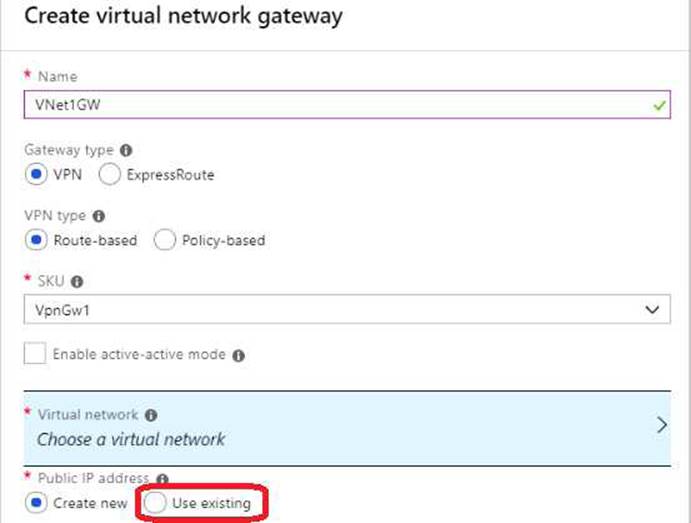
12

The settings are validated and you'll see the "Deploying Virtual network gateway" tile on the
dashboard. Creating a gateway can take up to 45 minutes.
Note: This task may take a very long time to complete. You do NOT need to wait for the deployment to complete this task successfully.
References:
https://docs.microsoft.com/en-us/azure/vpn-gateway/vpn-gateway-howto-site-to-site-resource- manager-portal

問題#3

Your Azure environment contains an application gateway and custom apps.
Another administrator modifies the application gateway and the apps to use HTTP
over TCP port 8080.
Users report that they can no longer connect to the apps.
You suspect that the cause of the issue is a change in the configuration of the application gateway.
You need to modify the application gateway to resolve the issue.
What should you do from the Azure portal?

A. Step 1:
Select Networking and then select Application Gateway in the Featured list, and select the application gateway, and select the settings.
Step 2:
Click HTTP for the protocol of the listener and make sure that the port is defined as 443.

11

References:
https://docs.microsoft.com/en-us/azure/application-gateway/create-ssl-portal

問題#4

99 percent availability.
You need to deploy and configure a solution for both machines in the Web-AS availability set to load balance the website over HTTP. The solution must use the load balancer your resource group.
What should you do from the Azure portal?

A. To distribute traffic to the VMs in the availability set, a back-end address pool contains the IP addresses of the virtual NICs that are connected to the load balancer. Create the back-end address pool to include the VMs in the availability set.
Step 1:
Select All resources on the left menu, and then select LoadBalancer from the resource list.
Step 2:
Under Settings, select Backend pools, and then select Add.
Step 3:
On the Add a backend pool page, select the Web-AS availability set, and then select OK:

10

References:
https://docs.microsoft.com/en-us/azure/load-balancer/quickstart-create-basic-load-balancer-portal

問題#5

Your company recently hired a user named janet-7509087@ExamUsers.com.
You need to ensure that janet-7509087@ ExamUsers.com can connect to load balancer named Web-LAB. The solution must ensure that janet-7509087@ ExamUsers.com can modify the backend pools.
What should you do from the Azure portal?

A. Step 1:
In the navigation list, choose Load Balancer.

9

Step 2:
Locate the load balancer named Web-ALB, and click the Access icon. Step3:
In the Users blade, click Roles. In the Roles blade, click Add to add permissions for the user Janet-
7509087@ExamUsers.com.
Step 4:
Add permission to modify backend pools
References:
https://docs.microsoft.com/en-us/azure/azure-stack/azure-stack-manage-permissions

試験コード: AZ-103問題数量: 369 Q&As更新時間:  2020-03-21

  AZ-103フルバージョンを入手