Testpassport

 sales@testpassport.jp

下記はMicrosoft 70-778試験問題集は実際の試験問題のバージョンの一部です。 MCSA 70-778問題集 は実際の試験問題バージョンには147問になります。すべての実際の試験問題は、勉強者が最初の試みで成功することを保証できます。70-778問題集の実際の試験問題でMicrosoft試験に不合格になった場合、全額で支払い手数料の払い戻しを受けられます。実際の試験問題をトレーニングしたいでしょうか? では、トレーニングしましょう!

 70-778フルバージョンを入手

問題#1

You have an app workspace that contains a dashboard and four reports. All the reports are generated from a single dataset that contains sales data for your company.
The reports display the data configured as shown in the following table.


You need to ensure that the users of the reports can locate the correct report by using natural language queries.
What should you do?

A. From the properties of the dataset, create four Featured Q&A Questions.
B. From the Format settings of the reports, modify the Page Information.
C. From the properties of the dataset, modify the Q&A and Cortana settings.
D. From the properties of the workspace, modify the Language Settings.

Explanation:
References: https://docs.microsoft.com/en-us/power-bi/service-q-and-a-direct-query#limitations-during-public-preview

問題#2

HOTSPOT
Your company plans to use Power BI for 20 users in the sales department.
The users will perform the following tasks:
- Access a published Power BI app
- Modify reports in an app workspace
- Share dashboards created in My Workspace
You need to identify which Power BI licenses are required for the tasks. The solution must use the Power BI (free) licenses, whenever possible.
Which license should you identify for each task? To answer, select the appropriate options in the answer area.
NOTE: Each correct selection is worth one point.


A. 

Explanation:
References:
https://docs.microsoft.com/en-us/power-bi/service-create-distribute-apps
https://docs.microsoft.com/en-us/power-bi/service-collaborate-power-bi-workspace

問題#3

You embed a Power BI report in a Microsoft SharePoint Online page.
A user name User1 can access the SharePoint Online page, but the Power BI web part displays the following error message: “This content isn’t available”.
User1 is unable to view the report.
You verify that you can access the SharePoint Online page and that the Power BI report displays as expected.
You need to ensure that User1 can view the report form SharePoint Online.
What should you do?

A. Publish the app workspace.
B. Edit the settings of the Power BI web part.
C. Modify the members of the app workplace.
D. Share the dashboards in the app workspace.

Explanation:
References: https://docs.microsoft.com/en-us/power-bi/service-embed-report-spo

問題#4

DRAG DROP
You have a Microsoft Excel workbook that contains two tables.
From Power BI, you create a dashboard that displays data from the tables.
You update the tables each day.
You need to ensure that the virtualizations in the dashboard are updated daily.
Which three actions should you perform in sequence? To answer, move the appropriate actions from the list of actions to answer area and arrange them in the correct order.


A. 

Explanation:
References: https://docs.microsoft.com/en-us/power-bi/refresh-scheduled-refresh

問題#5

Your organization has a team of power users who recently created 20 Power BI dashboards.
The power users share the dashboards with other users in the organization.
When the users attempt to access the dashboards, they receive the error message shown in the exhibit. (Click the Exhibit.)
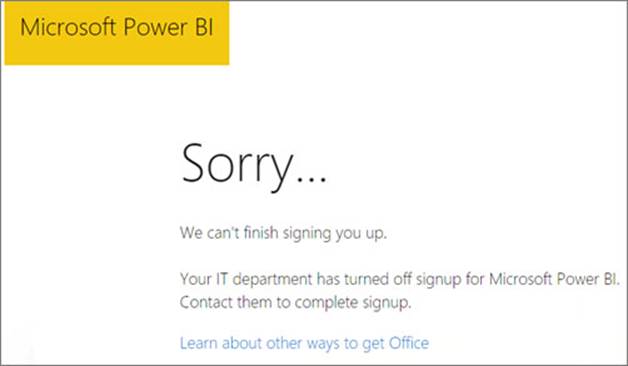


You need to ensure that all the users can access the dashboards.
What should you do first?

A. From the Microsoft Office 365 Admin center, and the Power BI (free) subscription, and then assign a license to each user.
B. From the Power BI Admin portal, modify the Privacy Settings.
C. From the properties of each dashboard, modify the Share dashboard settings.
D. Instruct each user to install Microsoft Office 2016.

Explanation:
References: http://www.nubo.eu/en/blog/2016/12/Enable-PowerBI-On-Office-365/

試験コード: 70-778問題数量: 147 Q&As更新時間:  2019-04-30

  70-778フルバージョンを入手